
Arvexa Performance Overlay v1.2.0
A live on-page performance overlay for admins. Install a plugin, reload the page — and see exactly what it cost you.
Tags / debug
293 WordPress plugins tagged “debug”. Every result links to a crawlable PlugIndex profile.
A live on-page performance overlay for admins. Install a plugin, reload the page — and see exactly what it cost you.

See exactly where every pixel of padding and margin is on your Elementor page - one toggle, no DevTools needed.

On-page bug tracker for pre-launch QA. Pin reports directly on the page, manage them in a clean admin list, integrate with external clients via REST.

Watches your WordPress site for database errors, plugin changes, 404 floods and PHP errors, and explains what it finds in plain English.

A developer debug bar plus a plain-English site performance report, with one-click cleanup, trend history, and an optional weekly email digest.

Wondering whether your WooCommerce checkout is slow? This plugin will tell you.

Shows the active theme template file in the toolbar or a small panel, for chosen administrators only.

Find which plugins are conflicting on your site. Scans for jQuery overrides, PHP errors, hook collisions and known incompatible plugin pairs.

Clockwork for WP is a plugin to work with the browser extension Clockwork. Clockwork is a Chrome extension for PHP development, extending Developer …

Find the WordPress plugin breaking your site. Safely detect, isolate, troubleshoot, and roll back plugin conflicts without taking your website offline …

Get a deeper insight of your Wordpress installation and view detailed information of your SQL queries

Find the plugin or theme that broke your site. Culprit catches fatal errors and white screens and names the culprit in plain English.

Quickly view the active template file and important page information directly in your WordPress admin bar.

Tools for facilitating JavaScript development in the customizer.

A beautiful debugging tool that lets you manage debug settings without editing wp-config.php file.
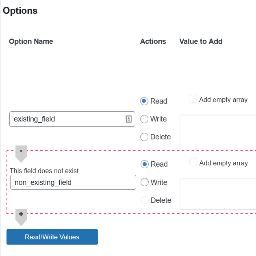
This plugin is the 'swiss army knife' of custom fields. It allows you to manipulate them from the dashboard to make it easy testing and debu …

A simple lightweight tool to debug wordpress data. X-ray vision for WordPress data structures with smart data decoding capabilities.

A simple plugin to toggle WP_DEBUG, WP_DEBUG_LOG, and WP_DEBUG_DISPLAY settings from the WordPress admin.
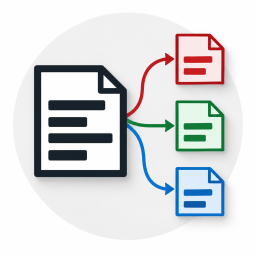
Splits the WordPress debug log into seven files by request type and shows the logs right in the admin.

Provide a PSR-3 compatible logger for WordPress core that writes to the debug.log

Professional debug management — toggle constants, view logs, track errors, monitor performance, emergency recovery, and export snapshots.

Debug WordPress from the admin bar: a live PHP console, a searchable debug log viewer, email logging and generated REST API docs.

The fastest and easiest way to switch debug mode on/off and view PHP info directly from the admin.

Manage WordPress debug settings from your dashboard. Toggle debug modes and prevent unauthorized changes.