
Admin Columns v7.1.8
Take control of your WordPress admin list tables. Add, remove, and reorder columns for posts, users, media, and more - no coding needed.
Tags / columns
90 WordPress plugins tagged “columns”. Every result links to a crawlable PlugIndex profile.
Take control of your WordPress admin list tables. Add, remove, and reorder columns for posts, users, media, and more - no coding needed.

Adds shortcodes to easily create columns in your posts or pages.

Enable Columns, Filters, Quick Edit and Bulk Edit for ACF Fields in WordPress List Tables

Adds shortcodes to easily create up to 42 different columned layouts.

Easily add desktop, tablet and mobile friendly columns to your content using an easy to use shortcode.

PixCodes offers a Classic Editor interface for inserting Pixelgrade shortcodes.

Gridable adds row and column layout controls to the WordPress Classic Editor.

This WordPress plugin boosts your website with... you guessed it, columns!

Easily add Genesis column shortcodes to your WordPress editor.
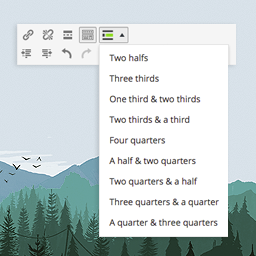
A responsive and easy-to-use tool for dividing your content in your posts/pages. This ultra-lightweight plugin allows you to put your content in colum …

Easily change the number of dashboard columns from Screen Options.

This plugin allows you to manage columns under the users page in the WordPress admin area.

A lightweight WordPress shortcodes plugin.

Three, four and five column screen layouts for the post editor.

WPC Admin Columns offers a listing of columns in the admin dashboards for different post-types.

Fully responsive Bootstrap 5 blocks, components and extends for Gutenberg

Did you ever want to add some custom columns to the posts overview page?

Easily display columnized content in your pages or posts.

Adds a "Reverse on Mobile" option to the Columns, Row, Stack and Media & Text blocks in Gutenberg.

Divides your post or page content into two or more columns, like a magazine article.

Enable Dashboard Columns in WordPress 3.8 or later

Easily display widgets in rows of columns.

With "Bootstrap's Columns Controller" you can easily use colums to customize your content

Wrap divs around classic editor content using divup shortcodes. Also works for Gutenberg, but you may prefer to use the group block.