Directory / plugin
PDF Rack – 3D Flipbook, PDF Viewer & Embed PDF
v1.5.3 · by codersuraz
Embed PDFs as a realistic 3D flipbook, page slider or scroll reader. A fast PDF viewer and PDF library for Gutenberg, Elementor and shortcodes.
About this plugin
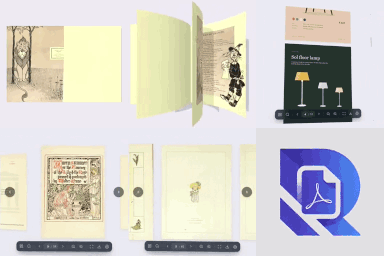
Turn any PDF into a realistic 3D flipbook on your WordPress site. PDF Rack is a PDF flipbook maker, PDF viewer and PDF embedder in one plugin: upload a catalogue, magazine, brochure, menu, e-book or report and your visitors flip through it like a real book — with page curl, page-turn shadows and click-to-flip — right on your page.
Prefer a classic layout? Every PDF can also be shown in a vertical scroll reader or a page-by-page slider, inline or in a full-screen popup. No iframes, no Flash, no browser plugins and no external service: the PDF flipbook runs in the visitor’s browser with Mozilla’s PDF.js and WebGL, on desktop, tablet and phone.
Unlike the WordPress Media Library that buries PDFs among thousands of images, PDF Rack gives you a dedicated PDF library to upload, categorise and find documents, then embed them with a Gutenberg block, an Elementor widget or a shortcode in seconds.
📖 Popular uses for the PDF flipbook
- Digital catalogues & product brochures — let shoppers flip through your catalogue and add products to the cart from the page (Pro).
- Online magazines, newsletters & e-books — a page-flip reading experience that keeps readers on your site.
- Restaurant menus, price lists & flyers — a mobile-friendly PDF viewer instead of a download.
- Annual reports, white papers & course handouts — searchable, shareable, with reading analytics (Pro).
🚀 Why site owners choose PDF Rack
- Save time — Upload, categorize, and find any PDF in seconds with built-in search and filters.
- Better user experience — Visitors read PDFs right on your page without leaving your site or installing anything.
- Works everywhere — Gutenberg block, Elementor widget, or a simple shortcode. Pick whatever fits your workflow.
- Mobile-ready — The viewer automatically adapts to any screen size so your content looks great on phones and tablets.
📋 Feature Highlights
- Dedicated PDF Dashboard — A focused admin panel just for your PDF documents, separate from the Media Library clutter.
- Categories & Tags — Organize documents with custom taxonomies for easy sorting and retrieval.
- Quick Search & Filter — Find any document instantly by name, category, or upload date.
- Media Library Preview — Preview PDF contents directly within the WordPress Media Library details view.
- Auto-Generate Covers — Generate and set a cover image for your PDFs on demand.
- 3D PDF Flipbook — A realistic WebGL page-flip book with page curl, shadows, spread detection, click or drag to turn pages, and zoom.
- PDF Reader & Slider — A vertical-scroll PDF reader and a page-by-page slider. Every viewer has thumbnails, outline, full-text search, zoom, fullscreen, download and print — powered by Mozilla’s PDF.js.
- Toolbar Modes — Keep the toolbar visible, auto-hide it while reading, or minimize it to a small page counter.
- Lightbox Viewer & Link Interceptor — Open PDFs in a responsive full-screen modal overlay from any button, link, image, or automatically intercept standard PDF links on your site.
- Gutenberg PDF Viewer Block — Embed a PDF viewer or flipbook in the block editor.
- Elementor Widgets — PDF Viewer and PDF Shelf widgets with a live preview in the Elementor editor.
- Shortcode Support — Use
[pdf-rack id="123"]in the Classic Editor or any text widget. - PDF Shelf — Show a category, a tag or hand-picked PDFs as a responsive cover gallery with
[pdf-rack-shelf]or the PDF Rack Shelf block; each cover opens in the popup viewer. - Share & Resume — A Share button and
#pagelinks open any PDF at a given page; returning readers can continue where they left off. - Lightweight & Fast — No bloat. The viewer loads only on pages where you embed a PDF.
💎 PDF Rack Pro
- Hardcover Flipbook — Rigid first & last pages that open like a real hardcover book.
- Coverflow Slider — A 3D coverflow effect for the slider viewer.
- Right-to-Left Reading — Turn pages right to left for Arabic, Hebrew, manga and more.
- Custom Viewer Background — Match the viewer stage to your brand.
- Brand Themes — Your accent colour, a dark, light or glass toolbar, round, soft or square corners, your theme’s font and your logo on every viewer.
- Download & Print Controls — Hide the download and print buttons per embed.
- Password Protection — Lock individual PDFs behind a password; the file address is never shown on the page.
- Watermarks — Stamp your site name, the viewer’s name or email, or the date across every page, including downloaded and printed copies.
- Reading Analytics — Views, unique visitors, reading time, read-through rate, downloads and prints, without storing IP addresses. Page attention shows the time spent on each page and where readers stop; export sessions as CSV and get a weekly email report.
- Shelf Styles — Wooden bookshelf, carousel and list-with-descriptions layouts for the PDF shelf, plus a search box and category filter.
- WooCommerce Documents — Attach manuals, datasheets and catalogues to products; they appear in a “Documents” tab and open in the viewer, optionally only for customers who bought the product.
- Interactive Hotspots — Draw clickable areas on any page: open a link, jump to a page, show a note, play a YouTube, Vimeo or MP4 video, or add a WooCommerce product to the cart. Works in every viewer and counts clicks.
- Sound — A soft page-turn sound for the flipbook and slider, and background music or narration per PDF with a play/pause button.
- Expiring & Limited Links — Share a private link to one PDF that stops working after a date or a number of viewers, with download on or off; turn it off at any time.
- Lead Capture — Ask for an email before a PDF opens or after a free preview of a few pages, then search, filter and export your leads as CSV.
⚙️ How It Works
- Go to PDF Rack Add New and upload your PDF.
- Assign a category (optional) to keep things organized.
- Embed it anywhere using the Gutenberg block, Elementor widget, or the auto-generated shortcode, and pick the flipbook, slider or reader.
That’s it — your visitors can now read the PDF directly on your site.
Third Party Libraries
This plugin utilizes the following third-party libraries to provide its functionality:
- PDF.js (Mozilla) – https://github.com/mozilla/pdf.js (Apache License 2.0)
- three.js – https://threejs.org (MIT) — 3D flipbook rendering
- React (Meta) – https://reactjs.org (MIT)
- Lucide Icons – https://lucide.dev (ISC)
- Date-fns – https://date-fns.org (MIT)
- pdf-lib – https://pdf-lib.js.org (MIT) — watermarked downloads