Directory / plugin
DestinX Product Configurator for WooCommerce
v0.9.28.5 · by destinx
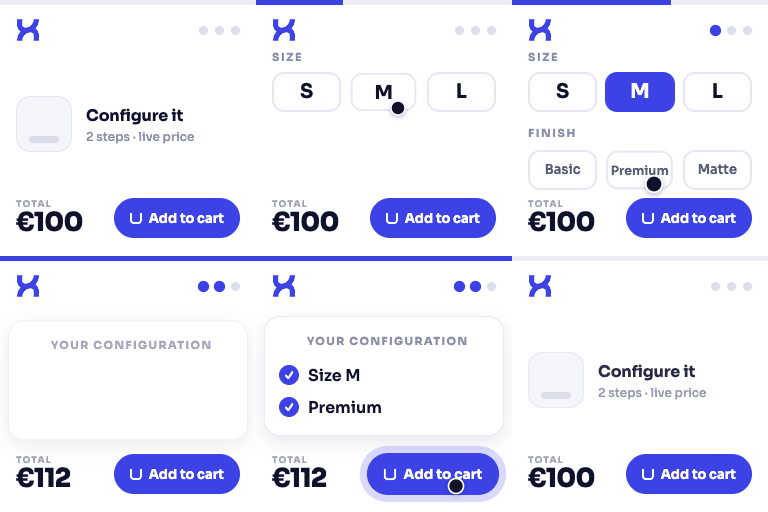
Build guided WooCommerce product configuration flows with reusable templates, option groups, and a live configuration recap.
About this plugin
DestinX Product Configurator helps WooCommerce store owners create guided product configuration experiences from reusable templates.
With DestinX Product Configurator you can:
- Create and manage reusable configuration templates
- Organize choices into guided steps and option groups
- Use select, radio, swatch, checkbox, and boolean choices
- Add a simple price adjustment to each option
- Assign templates to WooCommerce products
- Use the WooCommerce product price and standard product quantity
- Display a live recap on the product page
- Store the selected configuration in the cart, checkout, and order
- Start from a bundled example template
- Choose Minimal for progressive choices, product descriptions and native WooCommerce reviews
- Keep the product gallery or show the image associated with the selected option
- Keep quantity and total within reach with a responsive purchase bar
The plugin works independently after activation and does not require a license, account, or external service.
All bundled DestinX logos, demo images, and documentation screenshots are original works by Destinx and are distributed under GPLv2 or later with this plugin.
WooCommerce is a trademark of Automattic Inc. This plugin is independent and is not affiliated with, endorsed by, or sponsored by Automattic Inc.
Video Tutorials
Complete setup with the Starter Kit
Build a WooCommerce product configurator from scratch
Optional ConfigCraft Add-ons
The WordPress.org plugin is the complete free core and works without a license. ConfigCraft Pro, Quote, and Production are separate commercial plugins for advanced pricing, quotes, and production.
Compare Free and optional add-ons
Nothing is installed automatically. These external pages are requested only after a link is clicked.